WeCanvas
Private family photo sharing for baby updates, grandparents, and close relatives.

One phone number.
One private family page.

WeCanvas gives one household a quieter way to share baby updates, voice notes, and everyday moments with grandparents and close relatives, without pushing family life into group-chat chaos or public social feeds.

Family sharing moments together on WeCanvas

Need to review the invite and SMS consent flow? Start with the public SMS consent form. Each invited family member now signs in or creates an account from their secure invite before adding their own phone number and choosing SMS for themselves.

A Private Space

Not Social Media.

Simple enough for grandparents

The beta still starts with one secure invite, then sharing stays centered on a family number and one private page instead of another noisy app to learn.

See it in action

Built for the relatives who already know how to text

One number for the family. One private page to come back to. Especially useful when grandparents want baby updates without another noisy group chat.

  • One shared family number
  • No new app to learn
  • Optional low-pressure weekly recap
Manzo Family Updates
9 members
Byron holding newborn baby — shared on WeCanvas
Adding to the fam!
From Byron • Just now
Current canvas features

What each canvas already includes in the current product

These are live product views from the current WeCanvas app, not invented mockups. Every canvas gives families one dashboard entry, a shared page with pinned tools, and owner controls for the people inside it.

Current WeCanvas dashboard showing multiple canvases in the live product
Current dashboard

Every family space lives on one dashboard

The live product already lets you move between multiple canvases from one home screen, so different family groups do not collapse into one endless thread.

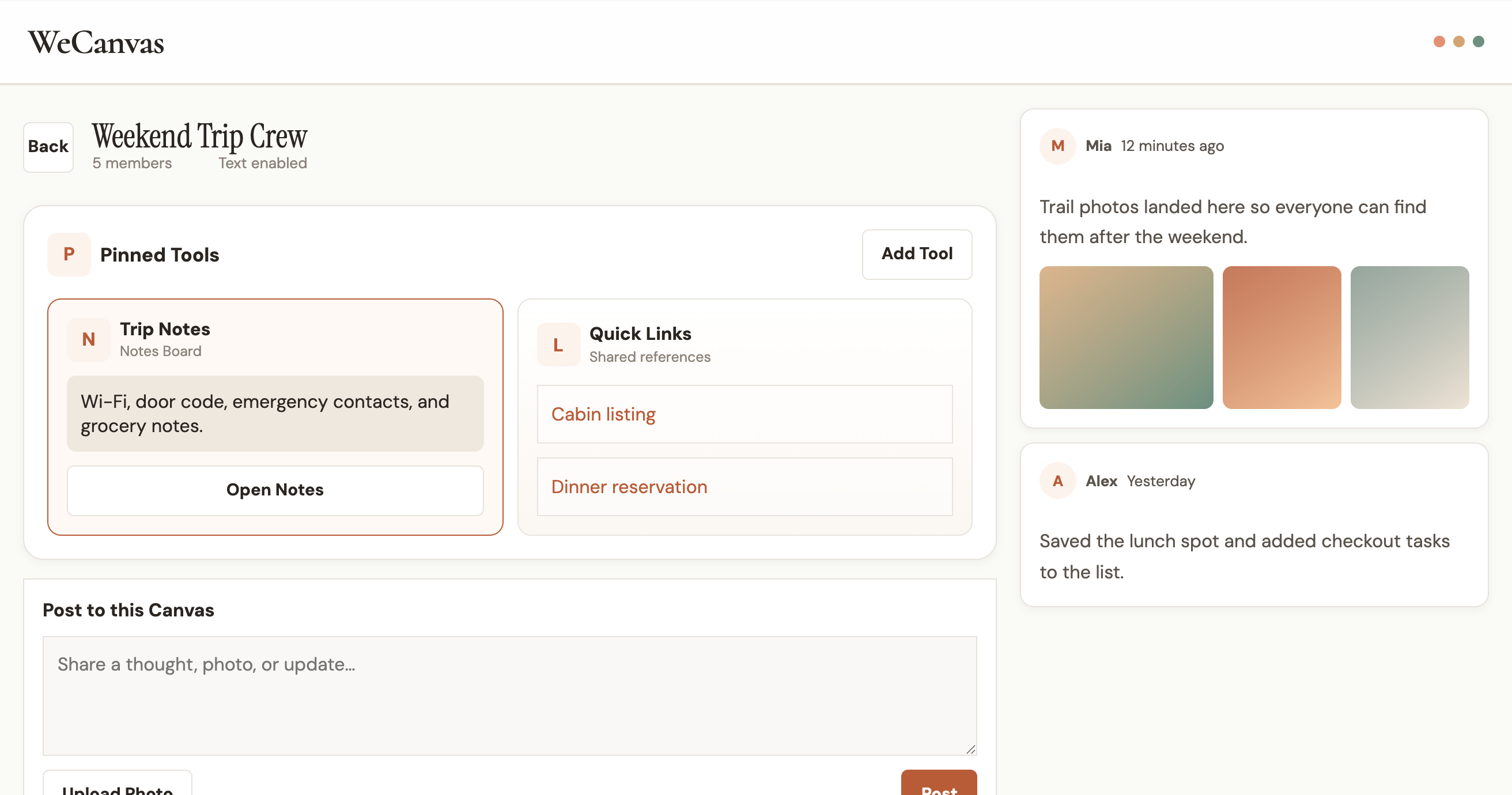
Current WeCanvas canvas showing pinned tools like notes, quick links, todo list, and family calendar
Current canvas view

Pinned tools stay at the top of every canvas

Today the live canvas view already supports pinned notes, quick links, todo lists, and a family calendar, with the posting composer directly underneath.

Current WeCanvas members settings showing who is inside a canvas and their role
Current owner controls

Owners can see who is inside the canvas

The current members view keeps access readable and confirms role state inside the canvas workspace instead of hiding that detail behind a separate admin system.

How It Works

Keep the family in the loop with one number and one shared page, starting with one secure invite setup.

1

Your family gets one shared WeCanvas number

Invite the people you trust once. Each invited family member opens their own secure invite, signs in or creates an account, and then enters the phone they personally use and chooses whether to opt into SMS for themselves. That shared WeCanvas number becomes the simple posting path for the family after setup.

2

Text anything to it

Photos, voice notes, updates — whatever you'd normally text your family group chat.

3

It appears on the canvas

Everything lands on a beautiful, shared page your whole family can view anytime.

4

Come back to one private page

After the one-time invite setup, the family has one quiet place to check instead of chasing updates across social posts and group chats.

The Johnsons
A family canvas
S M J D
Sarah
Just signed the kids up for soccer! Season starts next month.
2 hours ago
Michael
Beautiful day at the park with the kids
Dad and toddler walking together
5 hours ago
Dad
0:42
Demo voice note preview
Yesterday

Built first for baby updates and grandparents

New Baby, Shared Simply

Give grandparents and close family one number to text and one private page to check instead of juggling group chats, photo threads, and social posts.

"We shared baby updates here first so grandparents could text photos and everyone could keep up in one place."

Busy Parents

Keep extended family in the loop without the pressure of real-time group chats. Share when it's convenient.

"I text a quick pic during naptime and the whole family sees it when they check."

Families Separated by Distance

Stay connected across time zones without scheduling calls or managing group chat chaos.

"My brother in Japan and my parents in Ohio all see the same updates, no timing needed."

Private Family Updates

Share milestones, daily moments, and updates in a space that belongs to your family — not an algorithm.

"We shared the pregnancy news here first before posting anywhere else."

Questions? We've Got Answers

Everything you need to know about WeCanvas

No app download required. For this beta, family members join once from a secure invite so the right people have access, then posting can feel as simple as texting the shared WeCanvas number from the phone they connected.

Each canvas is built around one shared family number. Once a family member has joined from the secure invite, signed in or created an account, entered the phone they actually text from, and opted into SMS for themselves, their photo, update, or voice note can land on the private shared page for everyone else to see.

Each invited family member signs in or creates an account from the secure invite, then enters the phone number they personally use and chooses whether to opt into SMS for themselves. The person creating the canvas cannot opt in on someone else's behalf. You can review the public path at /sms-consent.

Your canvas is private to the people you invite. WeCanvas is built to help families stay close, not to sell attention. We do not sell your family's photos, messages, or phone numbers, and the current beta is free while the product is being shaped with a small group of real families.

WeCanvas is being built by Byron Manzo after needing a better way to share family updates privately. The beta is free while the product is being shaped with real feedback. The intended business model is a straightforward paid product later, not ads, data resale, or squeezing value out of family photos.

That's exactly who this is built for. The setup is still easiest when someone opens the invite for them once, but after that the sharing flow stays centered on texting and one simple private page instead of another busy app.

The canvas can be viewed from anywhere with an internet connection. Texting to post currently works with US phone numbers, with international support coming soon.

Still have questions?

Contact Support

Ready to try it?

Request beta access

Private beta. Best for new baby updates, grandparents, and families who want one quieter place to share after a one-time secure setup.